Using ArcGIS Pro to engage in Value Added Data Analysis
When using ArcGIS Pro, one of the very useful tutorials that one can take is a tutorial on calculating impervious surfaces from spectral imagery. This tutorial walks the user through the process of using multispectral data to analyze which areas are pervious and which are not, so that a local government, for example, can determine storm water bills for each property based on how much pervious versus impervious features exist on a parcel of land.To follow the step by step lessons that walk one through each step, follow the ArcGIS Pro tutorial linked here.
Below is listed a rough outline of the steps in each lesson. Because the tutorial shows the step by step process, I will just include a rough outline of these steps along with some of the resulting imagery.
Lesson 1: Segment the Imagery
- Download and open the project provided in the tutorial
- Extract the spectral bands that will allow the user to easily identify different features (See figure 1). The bands extracted were:
ii) Red band to emphasize man-made objects and vegetation.
iii) Blue band to show bodies of water.
 |
| Figure 1: Extracting Spectral Bands |
- Configure the classification wizard for segmenting the image.
- Segment the image by grouping neighboring pixels with similar spectral characteristics into groups (See figure 2).
 |
| Figure 2: Image Segmentation |
Lesson 2: Classify the Imagery
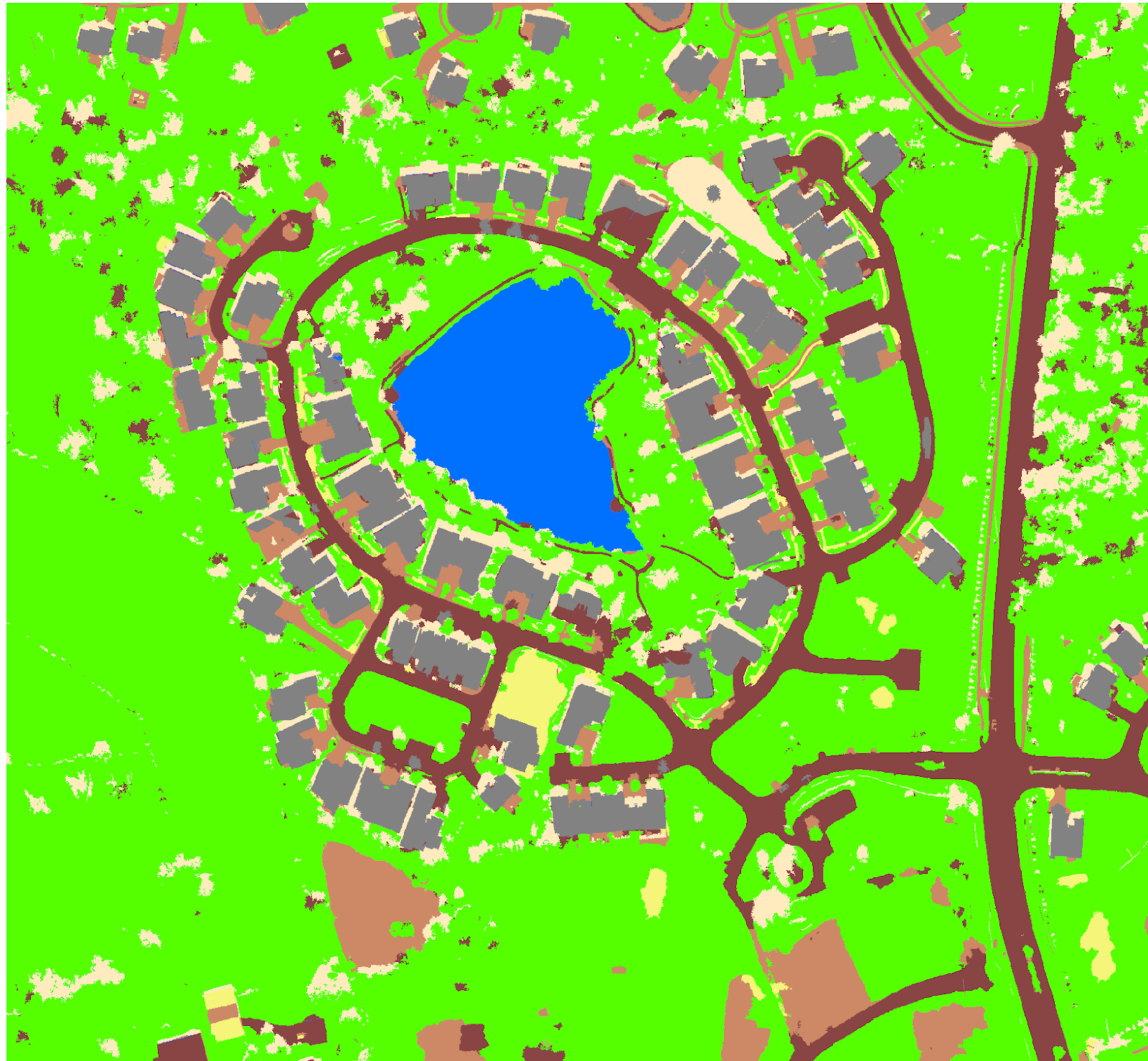
- Create training sample polygons of the different features by first creating two parent classes called impervious and pervious. Then within them, create subclasses of grey roofs, roads, driveways, bare earth, grass, water, and shadows. Within these subclasses, add polygon of examples of driveways, roads grass etc.. Figure 3 below shows examples of different sample polygons being selected.
 |
| Figure 3: Creating Training Samples |
- Classify the imagery using the samples gathered above and the Support Classification Vector classifier. Figure 4 shows the imagery once it has been classified.
 |
| Figure 4: Classifying the imagery |
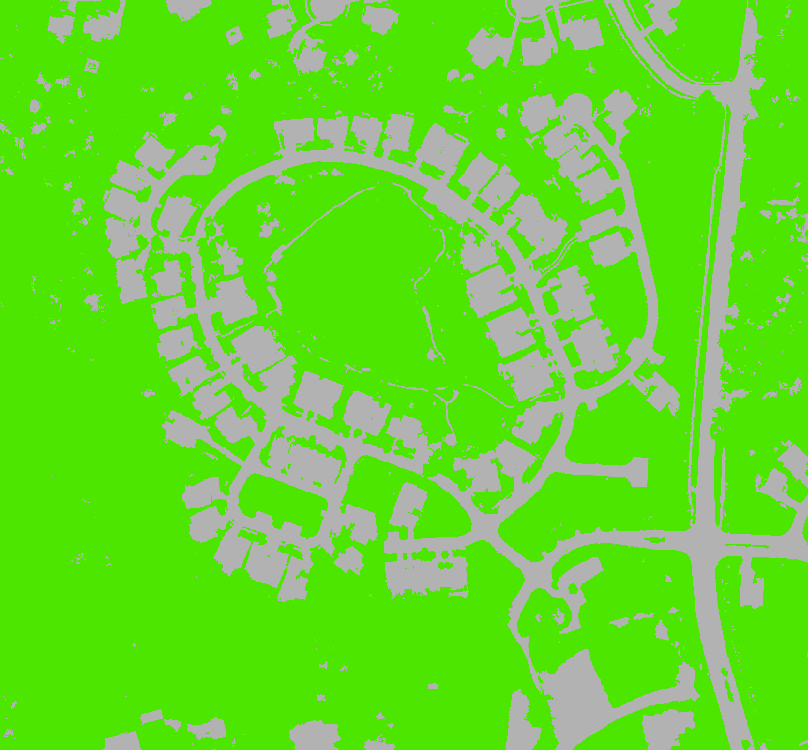
- Once classified, merge the subclasses into their parent classes to create a new layer with only two classes that show whether a feature is pervious or impervious (See figure 5).
 |
| Figure 5: Merging Classes |
- Reclassify errors where regions are misclassified with the Reclassify Within A Region tool within the wizard.
Lesson 3: Calculate Impervious Surface Area
- Create accuracy assessment points to measure the accuracy of the merged classification and use the resulting accuracy points table, along with the Louisville_Neighborhood TIFF, to assign ground truth values. Figure 6 shows the 100 stratified random sample points generated along with an abbreviated visualization of the ground truthing.
 |
| Figure 6: Accuracy Assessment Points and Ground Truthing Process |
- Compute a confusion matrix table to compare the classified data with the ground truth data to determine the percentage of accuracy between the two. Figure 7 below is a table showing the confusion matrix with 92% overall classification accuracy.
 |
| Figure 7: Confusion Matrix |
- Tabulate the impervious areas within specific parcels by first calculating the areas of impervious vs. pervious data, then merging it with the parcels layer for the final individualized parcel layer. Figure 8 shows a table containing the impervious and pervious areas.
 |
| Figure 8: Tabulated Pervious versus Impervious Areas |
- Symbolize the parcels to show the amount of impervious area in each parcel. Figure 9 is a map of the parcel areas sorted by color in terms of their impervious area.
 |
| Figure 9: Parcel Impervious Map |
Looking at the map, the most impervious areas are the roads in red, while the most pervious areas are those depicted in yellow. The colors in between correspond to medium impervious areas.
If one examines the lake in the center, for some reason it is shown as less pervious than the parcels with houses on them. This is probably a glitch however, for the purposes of charging storm water bills; it does not really factor in as no one individual owns that parcel.
